
How to Verify Whether a Group Purchase Payment Page Shared Through a Messenger Is the Seller’s Official Order Page
 0
0
 0
0
Participating in e-commerce “Group Purchases” (co-shopping or bulk-buying deals) across messaging applications like Telegram, WhatsApp, KakaoTalk, or Messenger has become a popular way for digital consumers to secure wholesale pricing. Organizers or merchants frequently drop custom checkout URLs directly into group chat threads to collect payments from participants.
However, these semi-public chat environments are heavily targeted by cybercriminals. Scammers deploy automated bots or impersonate group administrators to inject spoofed checkout links into fast-moving message threads. These malicious portals mirror official brand logos and CSS styling to harvest credit card numbers, steal personal IDs, or solicit non-refundable direct bank transfers. Protecting your financial data requires executing a strict, step-by-step payment audit before entering any sensitive details.

Link-injection mechanics in group chat environments
To avoid falling for a spoofed checkout link, you must first understand how attackers exploit group messaging dynamics.
Unlike official e-commerce websites where checkout buttons are hardcoded into secure server infrastructure, group chat rooms are unmonitored communication streams. Attackers monitor public or semi-private co-shopping channels and drop phishing links during high-traffic sales events. Because messages scroll rapidly, buyers frequently click shared links assuming they were posted by the trusted group organizer.
Before tapping any link inside a chat thread, perform URL preview hygiene:
- On mobile devices: Press and hold the shared link to reveal the underlying destination URL before your browser opens it.
- On desktop computers: Hover your mouse cursor over the link to inspect the full web address in the bottom corner of your browser.
- Domain inspection: Compare the link’s domain syntax against the merchant’s official primary domain. Look out for deceptive subdirectories or cheap Top-Level Domains (TLDs) like seller-order-pay.xyz or seller-checkout-line.top instead of seller.com/checkout.
Verification of payment gateway merchant identities
The most reliable technical test on any checkout page is inspecting the payment processor itself. Scammers can easily copy a brand’s frontend logo, color scheme, and product photos in seconds, but they cannot forge the hardcoded merchant identity within an established Payment Gateway (PG).
When you open a shared payment link, navigate directly to the final checkout form where you enter payment details. Legitimate international sellers route transactions through recognized, audited Payment Gateways such as Stripe, PayPal, KG Inicis, or Toss Payments.
When the payment gateway pop-up or iframe launches, inspect the Legal Merchant Name displayed at the top of the payment window. Established processors strictly verify business registration documents before issuing a merchant account. If the payment gateway displays an unfamiliar corporate entity, a completely different business name, or demands a direct peer-to-peer bank transfer to a personal account number, stop the transaction immediately.
Red flags on order pages and credential harvesting prompts
Fraudulent payment pages almost always incorporate suspicious data prompts or incomplete website footers designed to harvest personal information.
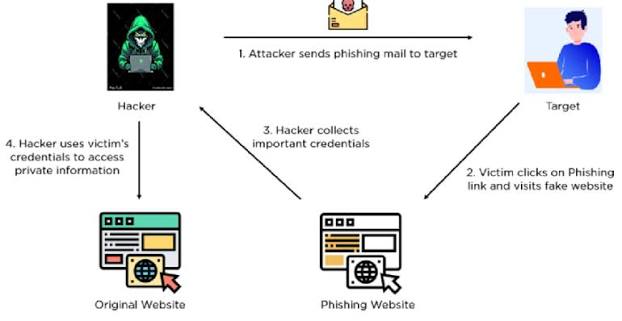
Demands for messenger login credentials
The absolute ultimate red flag on a shared payment page is a prompt asking for your social media or messaging app login details (e.g., “Sign in with Telegram/KakaoTalk to complete order”).
A legitimate e-commerce checkout page requires a shipping address, an email for order confirmation, and payment card details. It has zero technical need for your messaging app password. Scammers embed fake login prompts to execute credential harvesting, taking over your social media account to send malicious links to your personal contacts.
Scroll down to the footer of the shared page. Legitimate e-commerce merchants are legally required to display their business credentials, including their Business Registration Number (BRN), registered physical address, and customer service contact details.
Phishing pages usually feature completely blank footers or unclickable text placeholders for “Terms of Service” and “Privacy Policy.” Furthermore, inspect the browser’s address bar for an active SSL certificate (the padlock icon). If the browser displays a “Not Secure” warning or an invalid SSL certificate error, the connection is unencrypted and highly dangerous.
Emergency procedures for compromised cards and stolen logins
If you suspect you accidentally submitted credit card details or account credentials on a fake group purchase link, executing a rapid incident response protocol minimizes financial loss.
- Freeze payment cards instantly: Open your mobile banking app immediately and place a temporary freeze or lock on the card used during the transaction. This prevents the scammer from processing secondary automated charges.
- Contact your bank for a chargeback: Call your card issuer’s fraud department. Report that your card details were entered on a fraudulent phishing portal and request a new card with a fresh number.
- Terminate active messenger sessions: If you entered your messaging app credentials on the page, navigate to your app’s security settings (e.g., Settings > Devices / Active Sessions) and select “Log Out All Other Sessions.”
- Enable two-factor authentication (2FA): Immediately change your messaging account password and activate two-factor authentication using an authenticator app (like Google Authenticator) to permanently lock out unauthorized access.


